

Version 1.9
Edit
The edit menu in detail.
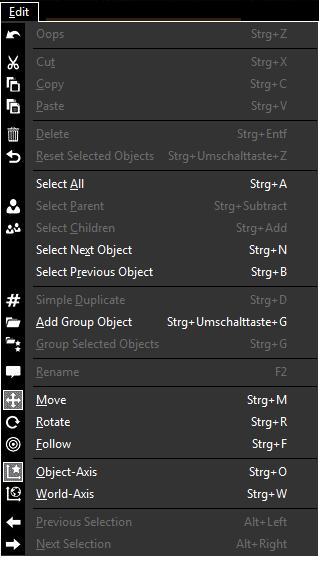
| Oops: last action | Undo the last actions. |
| Cut | Cuts text in the Properties View. |
| Copy | Copies the selected 3D object in the clipboard. Only 3D Objects view. |
| Paste | Pastes a 3D object from the clipboard. Only 3D Objects view. |
| Delete: selected elements | Deletes the selected 3D object. |
| Reset selected Objects | Sets the selected elements to the origin, 0,0,0. |
| Select All | Selects all objects. |
| Select Parent | Selects the parent object of a selected object. |
| Select Children | Selects the children object of a selected object. |
| Select Next Object | Selects the next object. |
| Select Previous Object | Selects the previous object. |
| Simple Duplicate | Creates a simple duplicate of the selected object. Only for 3D objects without output. |
| Add Group Object | Creates a group folder. |
| Group Selected Objects | Creates a group folder for selected objects. |
| Rename | Rename a 3D object or a camera in the Assets window. |
| Move | Turns on the move function. |
| Rotate | Turns on the rotation function. |
| Follow | Turns on the follow function. |
| Object Axis | Move or rotate along the axis of the object. |
| World Axis | Move or rotate along the world axis. |
| Previous | Selects the previous selected object. |
| Next | Selects the next object, if previous was clicked before. |